ShopDreamUp AI ArtDreamUp
Deviation Actions


Suggested Deviants


Suggested Collections


You Might Like…


![Minty Fresh. [PC Screenshot]](https://images-wixmp-ed30a86b8c4ca887773594c2.wixmp.com/f/ee7c62bd-521a-4295-b96e-2a25f177ea51/d5rttse-b2825986-9e3f-40b9-b4ad-2d151881ef3b.png/v1/crop/w_184,h_184,x_0,y_6,scl_0.09588327253778/minty_fresh___pc_screenshot__by_jlynnxx_d5rttse-92s-2x.png?token=eyJ0eXAiOiJKV1QiLCJhbGciOiJIUzI1NiJ9.eyJzdWIiOiJ1cm46YXBwOjdlMGQxODg5ODIyNjQzNzNhNWYwZDQxNWVhMGQyNmUwIiwiaXNzIjoidXJuOmFwcDo3ZTBkMTg4OTgyMjY0MzczYTVmMGQ0MTVlYTBkMjZlMCIsIm9iaiI6W1t7ImhlaWdodCI6Ijw9MjE2MCIsInBhdGgiOiJcL2ZcL2VlN2M2MmJkLTUyMWEtNDI5NS1iOTZlLTJhMjVmMTc3ZWE1MVwvZDVydHRzZS1iMjgyNTk4Ni05ZTNmLTQwYjktYjRhZC0yZDE1MTg4MWVmM2IucG5nIiwid2lkdGgiOiI8PTE5MTkifV1dLCJhdWQiOlsidXJuOnNlcnZpY2U6aW1hZ2Uub3BlcmF0aW9ucyJdfQ.mzak-YMrNatq23ybumpKzGD4R99dgQQlPsaxUtDVOxE)
![Minty Fresh. [PC Screenshot]](https://images-wixmp-ed30a86b8c4ca887773594c2.wixmp.com/f/ee7c62bd-521a-4295-b96e-2a25f177ea51/d5rttse-b2825986-9e3f-40b9-b4ad-2d151881ef3b.png/v1/crop/w_92,h_92,x_0,y_3,scl_0.04794163626889/minty_fresh___pc_screenshot__by_jlynnxx_d5rttse-92s.png?token=eyJ0eXAiOiJKV1QiLCJhbGciOiJIUzI1NiJ9.eyJzdWIiOiJ1cm46YXBwOjdlMGQxODg5ODIyNjQzNzNhNWYwZDQxNWVhMGQyNmUwIiwiaXNzIjoidXJuOmFwcDo3ZTBkMTg4OTgyMjY0MzczYTVmMGQ0MTVlYTBkMjZlMCIsIm9iaiI6W1t7ImhlaWdodCI6Ijw9MjE2MCIsInBhdGgiOiJcL2ZcL2VlN2M2MmJkLTUyMWEtNDI5NS1iOTZlLTJhMjVmMTc3ZWE1MVwvZDVydHRzZS1iMjgyNTk4Ni05ZTNmLTQwYjktYjRhZC0yZDE1MTg4MWVmM2IucG5nIiwid2lkdGgiOiI8PTE5MTkifV1dLCJhdWQiOlsidXJuOnNlcnZpY2U6aW1hZ2Uub3BlcmF0aW9ucyJdfQ.mzak-YMrNatq23ybumpKzGD4R99dgQQlPsaxUtDVOxE)
Featured in Groups


Description
i2 bar
-------
About
----------
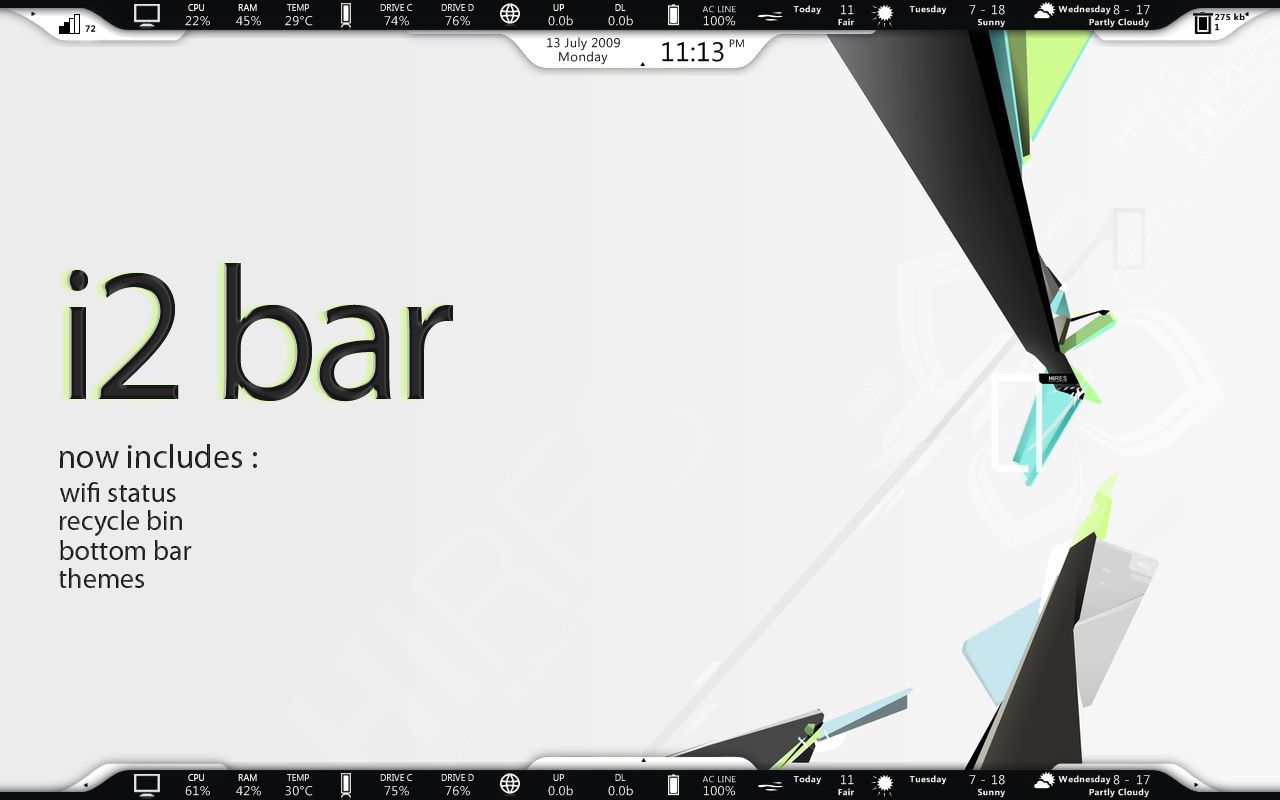
Get this idea from VPR Litestep, from that moment I want to use the that theme for rainmeter, and this is the result!
This skin is only for 1280 width resolution! But someone can modified it by extending the black edge, and also need to re-code again!
This bar have many features inside, from cpu stats until weather and also ANIMATED time bar, wifi, recycle bin!! (you must love this one)
Usage
--------
Wifi
The number shows the quality of your wifi
Recycle Bin
Left Click on Bin : Open Recycle Bin
Right Click on Bin : Delete Files
The numbers show the items and how many big of your files that are in recycle bin
Short Troubleshooting
---------------------
1. How can I change my weather location?
- You can find your location code in weather.com then right click computer stats bar and choose 'Edit Skin'
change the code into your location code.
2. When will you make for other resolutions?
- Well, I need someone help to me. My screen resolution is only 1280!! That's why I cannot make for higher resolution.
If you're willing to help me, just send email to shinji.ed2@gmail.com
Position Configuration
----------------------
1.Arrange your ANIMATED time bar, wifi, recycle bin below the Computer Stats bar like in preview
2.Right Click Computer Stats bar
3.Choose Skin Menu/Click Through
4.Right Click all ANIMATED bar
5.Choose Skin Menu/Position/Bottom
As rainmeter gets update, so is the i2 bar. Now you have i2 bar Top themes, just tick load when installation. So you don't need to check the position configuration of each config!
Credit
--------
-VPR LS by chiwou [link]
-Enigma by Kaelri [link]
-moxa weather by moxamax [link]
-Pre-Alpha Enigma Recycle Mon by ~gschoppe [link]
-Animation method by Chris Hennessey
-mepu [link]
-------
About
----------
Get this idea from VPR Litestep, from that moment I want to use the that theme for rainmeter, and this is the result!
This skin is only for 1280 width resolution! But someone can modified it by extending the black edge, and also need to re-code again!
This bar have many features inside, from cpu stats until weather and also ANIMATED time bar, wifi, recycle bin!! (you must love this one)
Usage
--------
Wifi
The number shows the quality of your wifi
Recycle Bin
Left Click on Bin : Open Recycle Bin
Right Click on Bin : Delete Files
The numbers show the items and how many big of your files that are in recycle bin
Short Troubleshooting
---------------------
1. How can I change my weather location?
- You can find your location code in weather.com then right click computer stats bar and choose 'Edit Skin'
change the code into your location code.
2. When will you make for other resolutions?
- Well, I need someone help to me. My screen resolution is only 1280!! That's why I cannot make for higher resolution.
If you're willing to help me, just send email to shinji.ed2@gmail.com
Position Configuration
----------------------
1.Arrange your ANIMATED time bar, wifi, recycle bin below the Computer Stats bar like in preview
2.Right Click Computer Stats bar
3.Choose Skin Menu/Click Through
4.Right Click all ANIMATED bar
5.Choose Skin Menu/Position/Bottom
As rainmeter gets update, so is the i2 bar. Now you have i2 bar Top themes, just tick load when installation. So you don't need to check the position configuration of each config!
Credit
--------
-VPR LS by chiwou [link]
-Enigma by Kaelri [link]
-moxa weather by moxamax [link]
-Pre-Alpha Enigma Recycle Mon by ~gschoppe [link]
-Animation method by Chris Hennessey
-mepu [link]
© 2009 - 2024 ld-jing
Comments121
Join the community to add your comment. Already a deviant? Log In
merci!